
Instructions to use numind/NuExtract-2.0-8B with libraries, inference providers, notebooks, and local apps. Follow these links to get started.
- Libraries
- Transformers
How to use numind/NuExtract-2.0-8B with Transformers:
# Use a pipeline as a high-level helper from transformers import pipeline pipe = pipeline("image-text-to-text", model="numind/NuExtract-2.0-8B") messages = [ { "role": "user", "content": [ {"type": "image", "url": "https://huggingface.co/datasets/huggingface/documentation-images/resolve/main/p-blog/candy.JPG"}, {"type": "text", "text": "What animal is on the candy?"} ] }, ] pipe(text=messages)# Load model directly from transformers import AutoProcessor, AutoModelForImageTextToText processor = AutoProcessor.from_pretrained("numind/NuExtract-2.0-8B") model = AutoModelForImageTextToText.from_pretrained("numind/NuExtract-2.0-8B") messages = [ { "role": "user", "content": [ {"type": "image", "url": "https://huggingface.co/datasets/huggingface/documentation-images/resolve/main/p-blog/candy.JPG"}, {"type": "text", "text": "What animal is on the candy?"} ] }, ] inputs = processor.apply_chat_template( messages, add_generation_prompt=True, tokenize=True, return_dict=True, return_tensors="pt", ).to(model.device) outputs = model.generate(**inputs, max_new_tokens=40) print(processor.decode(outputs[0][inputs["input_ids"].shape[-1]:])) - Notebooks
- Google Colab
- Kaggle
- Local Apps
- vLLM
How to use numind/NuExtract-2.0-8B with vLLM:
Install from pip and serve model
# Install vLLM from pip: pip install vllm # Start the vLLM server: vllm serve "numind/NuExtract-2.0-8B" # Call the server using curl (OpenAI-compatible API): curl -X POST "http://localhost:8000/v1/chat/completions" \ -H "Content-Type: application/json" \ --data '{ "model": "numind/NuExtract-2.0-8B", "messages": [ { "role": "user", "content": [ { "type": "text", "text": "Describe this image in one sentence." }, { "type": "image_url", "image_url": { "url": "https://cdn.britannica.com/61/93061-050-99147DCE/Statue-of-Liberty-Island-New-York-Bay.jpg" } } ] } ] }'Use Docker
docker model run hf.co/numind/NuExtract-2.0-8B
- SGLang
How to use numind/NuExtract-2.0-8B with SGLang:
Install from pip and serve model
# Install SGLang from pip: pip install sglang # Start the SGLang server: python3 -m sglang.launch_server \ --model-path "numind/NuExtract-2.0-8B" \ --host 0.0.0.0 \ --port 30000 # Call the server using curl (OpenAI-compatible API): curl -X POST "http://localhost:30000/v1/chat/completions" \ -H "Content-Type: application/json" \ --data '{ "model": "numind/NuExtract-2.0-8B", "messages": [ { "role": "user", "content": [ { "type": "text", "text": "Describe this image in one sentence." }, { "type": "image_url", "image_url": { "url": "https://cdn.britannica.com/61/93061-050-99147DCE/Statue-of-Liberty-Island-New-York-Bay.jpg" } } ] } ] }'Use Docker images
docker run --gpus all \ --shm-size 32g \ -p 30000:30000 \ -v ~/.cache/huggingface:/root/.cache/huggingface \ --env "HF_TOKEN=<secret>" \ --ipc=host \ lmsysorg/sglang:latest \ python3 -m sglang.launch_server \ --model-path "numind/NuExtract-2.0-8B" \ --host 0.0.0.0 \ --port 30000 # Call the server using curl (OpenAI-compatible API): curl -X POST "http://localhost:30000/v1/chat/completions" \ -H "Content-Type: application/json" \ --data '{ "model": "numind/NuExtract-2.0-8B", "messages": [ { "role": "user", "content": [ { "type": "text", "text": "Describe this image in one sentence." }, { "type": "image_url", "image_url": { "url": "https://cdn.britannica.com/61/93061-050-99147DCE/Statue-of-Liberty-Island-New-York-Bay.jpg" } } ] } ] }' - Docker Model Runner
How to use numind/NuExtract-2.0-8B with Docker Model Runner:
docker model run hf.co/numind/NuExtract-2.0-8B
Can the NuExtract Model Extract Tables from Images?
I have been using the NuExtract model to extract tables from images, and I applied the following template:
{
"table": [
{
"table_header": ["string"],
"table_rows": ["string"]
}
]
}
However, the results I received were not as accurate as I hoped for. I wanted to ask if there's a different way to structure the template or modify it to achieve better table extraction results.

Hello, thanks for trying out the model!
For tables, I have found the following to work pretty reliably.
{
"table": {
"header": [
"string"
],
"rows": [
{
"columns": [
{
"column": "string",
"value": "string"
}
]
}
]
}
}
This way the model can kinda break it down into an object hierarchy of table > row > columns/cell values.
Hopefully it works for your use case too!
Otherwise I'd suggest giving some ICL examples or, if the tables follow a similar format, put some prior knowledge of column names etc. in the template.
Hello,
Thanks for the suggestion! I tried the structure you provided, and it works in many cases. However, it tends to extract only the first column reliably. To address this, I found that specifying the column names directly in the template yields better results. Here's an example that worked for me:
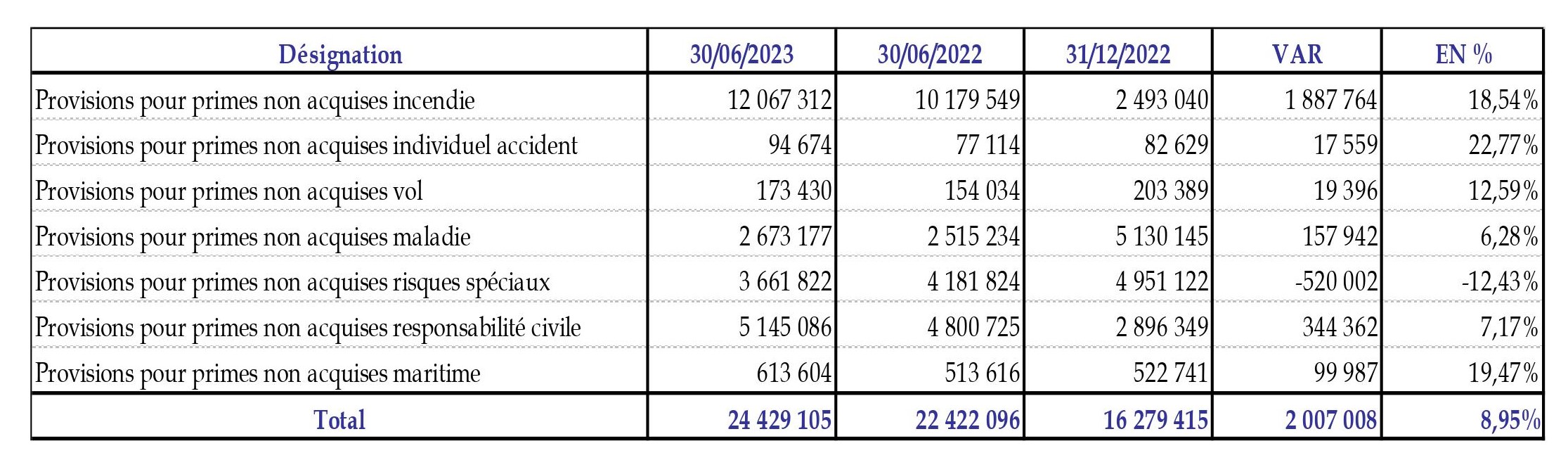
template = """{
"designation": ["string"],
"var": ["number"],
"en%": ["number"],
}"""
Output:
{
"designation": [
"Provisions pour primes non acquises incendie",
"Provisions pour primes non acquises individuel accident",
"Provisions pour primes non acquises vol",
"Provisions pour primes non acquises maladie",
"Provisions pour primes non acquises risques spéciaux",
"Provisions pour primes non acquises responsabilité civile",
"Provisions pour primes non acquises maritime"
],
"var": [
1887764,
17559,
19396,
157942,
-520002,
344362,
99987
],
"en%": [
18.54,
22.77,
12.59,
6.28,
-12.43,
7.17,
19.47
]
}
I also tested it in my notebook, where I evaluated the model on various cases, and it worked well. You can check out the notebook and repository where I test different models and solutions for data extraction, OCR, and structured data extraction from images:
NuExtract-2.8B Structured Data Extraction Notebook
Docs Parsing Techniques Repository
