Instructions to use nota-ai/ERGO-7B with libraries, inference providers, notebooks, and local apps. Follow these links to get started.
- Libraries
- Transformers
How to use nota-ai/ERGO-7B with Transformers:
# Use a pipeline as a high-level helper from transformers import pipeline pipe = pipeline("image-text-to-text", model="nota-ai/ERGO-7B") messages = [ { "role": "user", "content": [ {"type": "image", "url": "https://huggingface.co/datasets/huggingface/documentation-images/resolve/main/p-blog/candy.JPG"}, {"type": "text", "text": "What animal is on the candy?"} ] }, ] pipe(text=messages)# Load model directly from transformers import AutoProcessor, AutoModelForImageTextToText processor = AutoProcessor.from_pretrained("nota-ai/ERGO-7B") model = AutoModelForImageTextToText.from_pretrained("nota-ai/ERGO-7B") messages = [ { "role": "user", "content": [ {"type": "image", "url": "https://huggingface.co/datasets/huggingface/documentation-images/resolve/main/p-blog/candy.JPG"}, {"type": "text", "text": "What animal is on the candy?"} ] }, ] inputs = processor.apply_chat_template( messages, add_generation_prompt=True, tokenize=True, return_dict=True, return_tensors="pt", ).to(model.device) outputs = model.generate(**inputs, max_new_tokens=40) print(processor.decode(outputs[0][inputs["input_ids"].shape[-1]:])) - Notebooks
- Google Colab
- Kaggle
- Local Apps
- vLLM
How to use nota-ai/ERGO-7B with vLLM:
Install from pip and serve model
# Install vLLM from pip: pip install vllm # Start the vLLM server: vllm serve "nota-ai/ERGO-7B" # Call the server using curl (OpenAI-compatible API): curl -X POST "http://localhost:8000/v1/chat/completions" \ -H "Content-Type: application/json" \ --data '{ "model": "nota-ai/ERGO-7B", "messages": [ { "role": "user", "content": [ { "type": "text", "text": "Describe this image in one sentence." }, { "type": "image_url", "image_url": { "url": "https://cdn.britannica.com/61/93061-050-99147DCE/Statue-of-Liberty-Island-New-York-Bay.jpg" } } ] } ] }'Use Docker
docker model run hf.co/nota-ai/ERGO-7B
- SGLang
How to use nota-ai/ERGO-7B with SGLang:
Install from pip and serve model
# Install SGLang from pip: pip install sglang # Start the SGLang server: python3 -m sglang.launch_server \ --model-path "nota-ai/ERGO-7B" \ --host 0.0.0.0 \ --port 30000 # Call the server using curl (OpenAI-compatible API): curl -X POST "http://localhost:30000/v1/chat/completions" \ -H "Content-Type: application/json" \ --data '{ "model": "nota-ai/ERGO-7B", "messages": [ { "role": "user", "content": [ { "type": "text", "text": "Describe this image in one sentence." }, { "type": "image_url", "image_url": { "url": "https://cdn.britannica.com/61/93061-050-99147DCE/Statue-of-Liberty-Island-New-York-Bay.jpg" } } ] } ] }'Use Docker images
docker run --gpus all \ --shm-size 32g \ -p 30000:30000 \ -v ~/.cache/huggingface:/root/.cache/huggingface \ --env "HF_TOKEN=<secret>" \ --ipc=host \ lmsysorg/sglang:latest \ python3 -m sglang.launch_server \ --model-path "nota-ai/ERGO-7B" \ --host 0.0.0.0 \ --port 30000 # Call the server using curl (OpenAI-compatible API): curl -X POST "http://localhost:30000/v1/chat/completions" \ -H "Content-Type: application/json" \ --data '{ "model": "nota-ai/ERGO-7B", "messages": [ { "role": "user", "content": [ { "type": "text", "text": "Describe this image in one sentence." }, { "type": "image_url", "image_url": { "url": "https://cdn.britannica.com/61/93061-050-99147DCE/Statue-of-Liberty-Island-New-York-Bay.jpg" } } ] } ] }' - Docker Model Runner
How to use nota-ai/ERGO-7B with Docker Model Runner:
docker model run hf.co/nota-ai/ERGO-7B
ERGO: Efficient High-Resolution Visual Understanding for Vision-Language Models
ERGO (Efficient Reasoning & Guided Observation) is a large vision–language model trained with reinforcement learning on efficiency objectives, focusing on task-relevant regions to enhance accuracy and achieve up to a 3× speedup in inference.
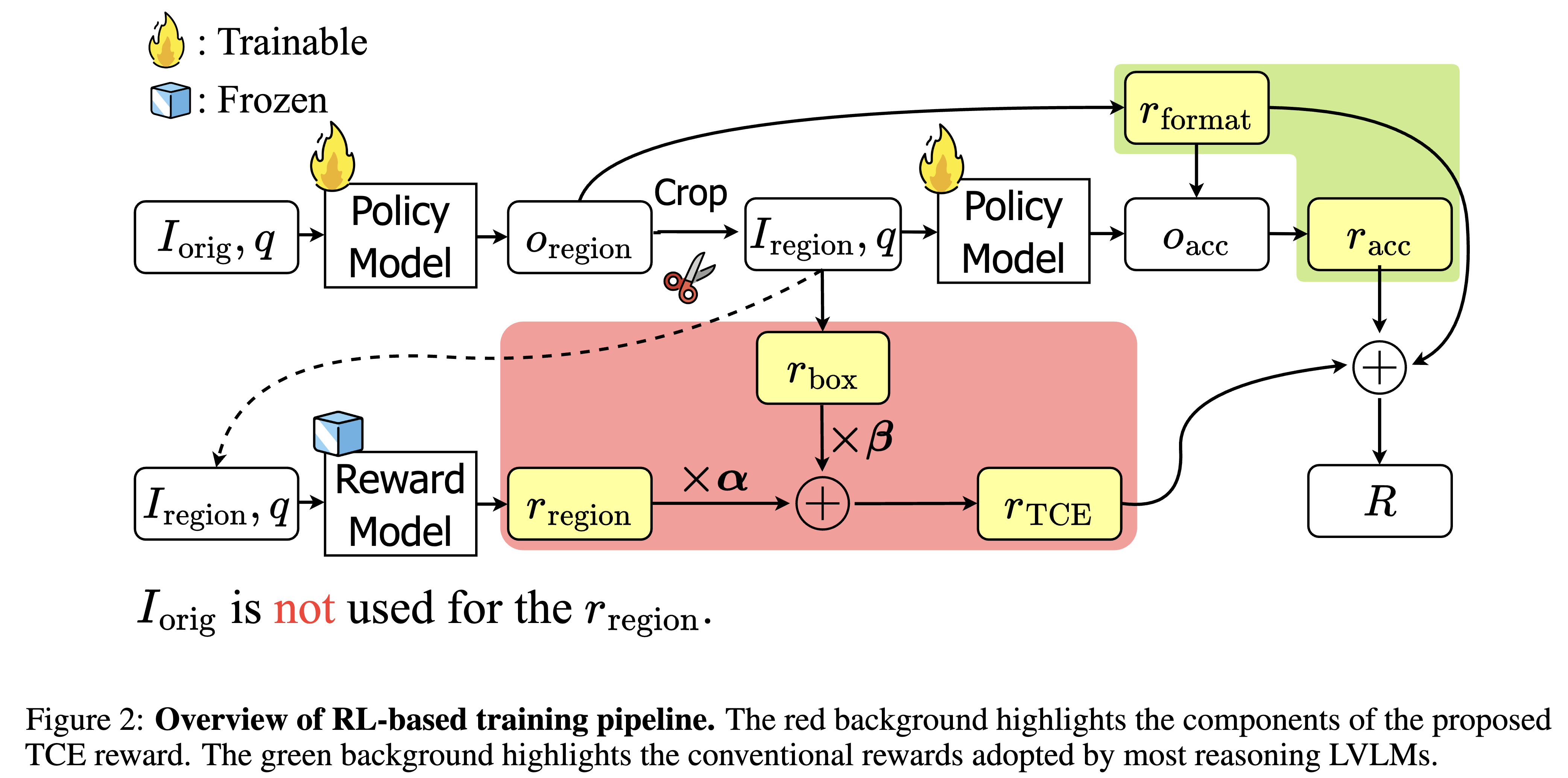
Installation
Python >= 3.10 is required.
curl -LsSf https://astral.sh/uv/install.sh | sh
git clone https://github.com/nota-github/ERGO.git
cd ERGO
uv venv
uv sync
source .venv/bin/activate
uv pip install -e .
Usage
We recommend using vLLM, as its
Automatic Prefix Cachingcan significantly improve inference speed.
This repository provides evaluation scripts for the following benchmarks:
See data/README.md for how to prepare datasets
Evaluation with vLLM
- Serving with vLLM
bash ./scripts/run_vllm.sh
- Run eval.py
export MAX_VISION_TOKEN_NUM=1280
export VLLM_ENDPOINT=http://127.0.0.1:8008/v1
export DATA_ROOT=./data
python ./src/ergo/eval.py \
--dataset {choose from [vstar, mmerwl, hrbench]} \
--data_root $DATA_ROOT\
--api_url $VLLM_ENDPOINT \
--max_vision_token_num $MAX_VISION_TOKEN_NUM
Inference with Hugging Face
python ./src/ergo/infer.py \
--input_path {default = "./data/demo/demo.jpg"} \
--question {default = "Is the orange luggage on the left or right side of the purple umbrella?"} \
{--save_output} # optional
License
This project is released under Apache 2.0 licence.
Acknowledgements
We would like to express our sincere appreciation to the following projects:
- Qwen2.5-VL: The base model we utilized. They are originally licensed under Apache 2.0 License.
- VLM-R1: The RL codebase we utilized. It is originally licensed under Apache 2.0 License.
- V*, HR-Bench, MME-RealWorld-lite : The evaluation benchmark dataset we utilized.
We also deeply appreciate the generous GPU resource support from Gwangju AICA.
Citation
@misc{lee2025ergoefficienthighresolutionvisual,
title={ERGO: Efficient High-Resolution Visual Understanding for Vision-Language Models},
author={Jewon Lee and Wooksu Shin and Seungmin Yang and Ki-Ung Song and DongUk Lim and Jaeyeon Kim and Tae-Ho Kim and Bo-Kyeong Kim},
year={2025},
eprint={2509.21991},
archivePrefix={arXiv},
primaryClass={cs.CV},
url={https://arxiv.org/abs/2509.21991},
}
- Downloads last month
- 96
